Webflow MCP + Claude is a must-have
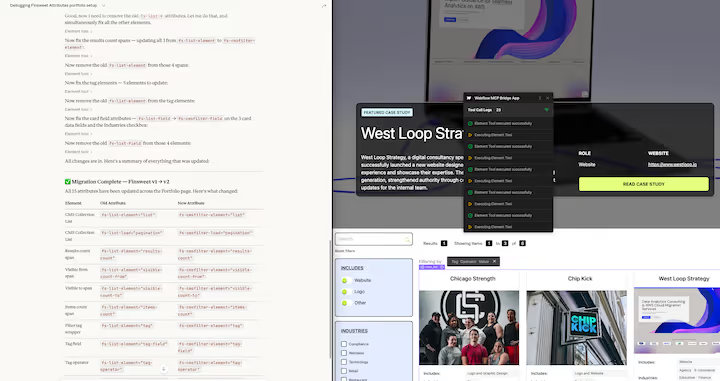
Why this matters for teams building in Webflow
Webflow is great at making changes quickly, but most teams still lose time to:
- Hunting through Designer settings and scattered components
- Repeating the same checks across pages and clients
- Debugging “mystery” layout issues from CSS overrides, interactions, and symbols
- Updating SEO, accessibility, and performance details one-by-one
The Webflow MCP server acts like a bridge between Claude and Webflow project data and operations. The Claude Connector then makes that bridge usable in day-to-day work by letting Claude “see” what is in the project and help you take action with guardrails.
In practice, this combo turns a lot of Webflow work into:
- Ask → inspect → propose → implement → verify
What “practical” looks like: real workflows we use
Below are the most useful patterns for increasing efficiency, speeding up development, and improving long-term maintenance.
When you inherit a site or jump into a new client build, the biggest time sink is context.
With MCP + Claude, you can quickly generate:
- A site inventory (pages, collections, key templates)
- A component map (sections, symbols, reusable blocks)
- A styles audit (typography, colors, spacing utilities)
- An interactions summary (what animations exist and where)
Why it speeds things up: You stop guessing how the site is put together. Claude can summarize the structure and point to the exact place to edit.
Common Webflow bugs are not hard, they are just tedious:
- Unexpected spacing from nested flex and grid rules
- Conflicting class combos
- Hard-coded padding on a Symbol that “leaks” everywhere
- Mobile breakpoints that drift over time
A strong MCP workflow is:
- Describe the symptom: “H2 is wrapping weird on tablet.”
- Claude inspects the relevant structure and styles.
- Claude suggests the smallest fix, and explains tradeoffs.
- Claude helps implement the change consistently.
Why it improves quality: You get fewer “fix one page, break another” changes because the reasoning is tied back to the underlying structure.
Most Webflow sites accumulate “class debt”:
- Multiple classes that mean the same thing
- One-off classes added during crunch time
- Repeated sections that should have become a component
MCP + Claude can accelerate refactors like:
- Consolidating duplicate utility classes
- Standardizing headings and spacing tokens
- Converting repeated sections into Symbols or reusable patterns
- Identifying unused classes and cleaning them up
Key value: Refactors become repeatable and lower risk because Claude can help build a plan and apply it systematically.
A lot of real Webflow work is “do this everywhere”:
- Add a new disclaimer to all blog posts
- Update internal linking rules
- Fix alt text patterns
- Normalize meta titles and descriptions
Instead of manual spot-checking, you can use Claude to:
- Find every instance of a pattern
- Propose a consistent update
- Apply changes in batches
- Validate what changed
Result: Hours turn into minutes, especially on sites with large CMS libraries.
Audits are easy to generate and easy to ignore. The difference is making them “fix-ready.”
Claude is useful here because it can translate best practices into concrete changes:
- Missing or duplicated H1/H2 structure
- Thin meta descriptions
- Images missing alt text, or alt text that is not descriptive
- Buttons and links with vague labels like “Learn more”
- Form input labels and error states
Why this is practical: You can produce a prioritized list of fixes, then implement them immediately with consistent copy and formatting.
For marketing teams, the steady work is building new pages while keeping brand consistency.
A solid MCP pattern is:
- Ask Claude for a page blueprint (sections, components to reuse, required CMS fields)
- Generate on-brand copy variants
- Ensure the page matches the site’s spacing and typography standards
Outcome: Faster builds and fewer design inconsistencies.
How we use this at Homade
We build and maintain multiple Webflow properties for clients, often with a mix of:
- Ongoing site tweaks
- CMS and content operations
- Component library improvements
- Performance and SEO iterations
MCP + Claude fits into that reality because it helps us:
- Move faster on small requests
- Be more systematic on large updates
- Keep maintenance clean so future work is cheaper
Recommended “efficiency playbook” (simple, repeatable)
If you want a lightweight, repeatable workflow, start with this:
- Inventory: map pages, CMS collections, and core components.
- Baseline audits: performance, SEO, accessibility, class debt.
- Refactor plan: pick 1–3 high ROI cleanups (typography, spacing, utilities).
- Batch fixes: apply consistent updates across the site.
- Verify: spot-check breakpoints, run a final QA list.
Common pitfalls to avoid
- Over-automation without standards: If the design system is unclear, faster changes can amplify inconsistency.
- Big-bang refactors: Prefer incremental improvements that can be verified quickly.
- Skipping verification: Any speed gain should include a final QA pass across breakpoints and key templates.
Closing thought
The Webflow MCP server and Claude Connector are not just “AI helpers.” Used well, they turn Webflow work into a more reliable development practice: clearer understanding, faster debugging, and maintenance that improves over time instead of getting harder.
If you want, you can treat this as the foundation of a recurring maintenance offering: monthly audits, cleanup sprints, and systematic improvements that compound.