WebbTech LMS
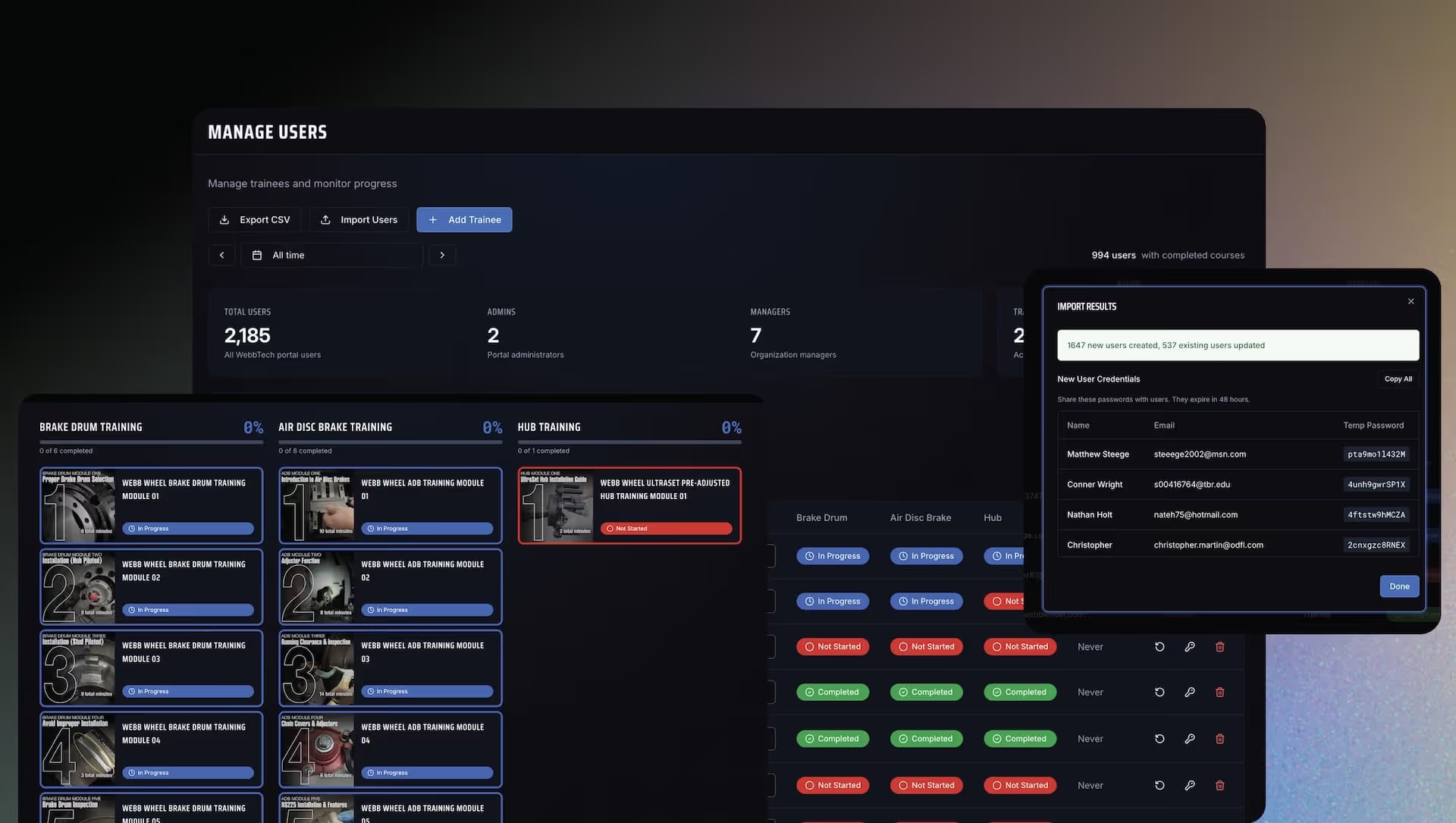
WebbTech LMS transformed the training experience for Steel Croissant by integrating scattered materials into a cohesive, mobile-friendly platform, saving the company $45,000–$60,000 in development costs. The custom training website streamlined content access, improved user onboarding time from 40 hours to just 1 hour per month, and enhanced administrative insights into usage and engagement.
Overview
WebbTech teaches distributors and technicians about wheel-end products and how to service them. Their training materials were spread out across PDFs, videos, and different tools, which made it hard to track progress and create a smooth learning experience.
Steel Croissant hired Homade to build a custom training website using AI tools and Replit. This was built at the same time as the main website redesign. The result is a mobile-friendly platform that brings all content together in one place, provides useful data, and helps technicians find answers quickly.
Cost $8,000–$10,000 instead of the typical $55,000–$70,000—saving about $45,000–$60,000.
Goals
- Bring scattered content together: One branded place for videos, guides, and tests.
- Make training easy to use: Focus on clarity and speed for busy technicians.
- Let WebbTech update content themselves: Admins can manage content without needing developers.
- Plan for future growth: Make it easy to add more training later.
- Build alongside the website: Deliver the training portal without slowing down the website redesign.
Research and Planning
- Interviews: Talked with trainers, sales, and support to understand how training works.
- Content review: Made a list of all modules, videos, and documents.
- User paths: Planned out how technicians, distributors, and sales reps would use the system.
Core ideas:
- "Don't make me dig"—find what you need in two or three clicks.
- "Training builds confidence"—the interface should feel reliable and calm.
- "Built to grow"—support future needs without starting over.
Design
How Content is Organized
- Browse by role and task: Users find content based on their job and what they need to do (diagnose, install, fix problems).
- Module structure: Each module has an overview, goals, content, and quizzes.
- Guided paths: Suggested paths for new users and easy access for people coming back.
Interface and Visual Design
- Layout: Clear navigation, plenty of white space, helpful buttons.
- Visual style: Simple color scheme with accent colors for status; clear action labels.
- Accessibility: Good contrast and keyboard navigation following web standards.
Technical Structure
- Front end: Mobile-friendly, reusable design components.
- Back end: Content types for courses, lessons, quizzes, and progress. PostgreSQL database.
- Admin tools: Create and edit modules, reorder content, view engagement data, save drafts, bulk upload 2,000+ users.
- Security: Four permission levels, encrypted passwords, role-based access, data validation.
Built with AI-assisted development on Replit—one developer doing work that usually needs a full team.
Main Features
1. Custom dashboards
Each user sees a dashboard with starter modules, suggested content, and their progress.
2. Step-by-step training modules
Consistent 1–10 step format with overview, videos and documents, and quizzes with instant feedback.
3. Video tracking
- System tracks progress every 30 seconds.
- Must watch 100% of video before quiz unlocks.
- Can resume where you left off and smooth playback for large files.
4. Progress tracking and certificates
- Tracks lesson and module completion with data.
- Saves quiz attempts and scores.
- Automatic PDF certificates.
5. Works on phones
Designed for use in the shop with easy-to-read text, large buttons, and fast loading. The previous experience lacked mobile responsiveness, limiting access to trainees.
6. Cost tracking
Live usage tracking, cost logging, and profit calculations for clear billing.
Problems Solved
- Bulk import speed: Fixed timeout errors when importing thousands of users by processing in batches. Imports now finish in seconds.
- Duplicate emails: Added smart logic to handle duplicates for 100% import success.
- Manager access: Made sure managers can only see their own organization's data.
- Video completion tracking: Required 100% completion with server confirmation so quizzes unlock reliably.
Results
Transformed training from scattered files into one smooth learning experience.
- $45,000–$60,000+ saved: Cost $8,000–$10,000 instead of the typical $55,000–$70,000+.
- Faster access: Find the right module in a few clicks instead of searching through drives and emails.
- Consistent experience: One interface for all content.
- Better insights: Admins can see usage, where people drop off, and where to invest.
- Time savings: User onboarding: 40 hrs/month → 1 hr. Certificates: $5 → $0. Tracking: 20 hrs/month → automatic.
- No project conflicts: Website and portal projects didn't interfere with each other.
Related Projects
View projects within the same niches.